
Hot weather can make it difficult to stay comfortable while trying to reduce your electricity bill. But saving energy at home doesn’t necessarily mean using your air conditioner less. How you set the temperature, which spaces you cool, and how you use your air conditioner throughout the day can all affect air conditioner electricity consumption. Small cooling habits, such as keeping the temperature stable, avoiding cooling empty spaces, and checking your energy use, can make a difference. Smart functions can also make these habits easier to maintain by taking care of some everyday adjustments automatically. Here are five daily air conditioner tips for staying comfortable while keeping cooling costs in mind.

*This image is AI-generated.
1. Maintain a Stable Temperature Instead of Constantly Changing the Setting
Lowering the thermostat is often the first thing people do when a room feels too warm. Many people set the temperature as low as 18°C (64°F), hoping to cool the room more quickly, then raise it again once it starts to feel too cold. However, the thermostat is not a control for how fast an air conditioner cools. Instead, it tells the system what temperature to maintain. Setting the temperature lower than necessary may cause the air conditioner to continue cooling even after the room has become comfortable, leading to constant temperature adjustments.
For more efficient cooling, it is better to choose a realistic target temperature rather than setting the thermostat excessively low from the start. ASHRAE recommends setting the thermostat to 24°C (76°F) or higher for occupied spaces during the daytime in summer.¹) Use this as a starting point, then adjust it gradually based on your indoor environment and personal comfort. Once the room feels comfortable, try to leave the thermostat where it is and let the air conditioner maintain the set temperature.
How LG Helps
Stay Comfortable with Airflow That Adapts
Having to adjust the temperature and airflow every time you use your air conditioner can feel like an added chore. Even at the same temperature, what feels comfortable can change depending on the room you’re in, even down to where you’re standing. AI Air on LG DUALCOOL™ AI automatically optimizes cooling and airflow direction based on operating conditions. Just one press of the AI Air button helps you stay comfortably cool without the need for constant manual control.

2. Avoid Cooling Spaces That Are Not in Use
When using an air conditioner efficiently, where and when you cool can be just as important as the temperature you select. If your air conditioner continues to run at high output while you step out briefly, or cools an unoccupied room for a long time, energy may be used where it is not needed. However, turning the air conditioner off every time you leave and then setting it to the lowest temperature after returning to a hot home isn’t the most efficient approach either. It’s better to choose based on how long you will be away and the conditions of your space at the time.
How LG Helps
Cooling That Adjusts When You Step Away
It’s easy to leave the air conditioner running when you step into another room or move around the house, especially since it can feel like a hassle having to check on it every time you step away. Human Detecting Sensor²⁾ on LG DUALCOOL™ AI is designed to detect when no one appears to be in the room and automatically turns off the air conditioner, making it easier to reduce energy use without having to remember to check or turn it off every time you leave.
Control Cooling and Heating from Anywhere
When you’re away from home, you may realize you left the air conditioner on or find that your plans have changed. With the LG ThinQ³⁾ app, you don’t have to wait until you’re back home to manage your air conditioner.
With LG ThinQ, you can:
• Turn your air conditioner on or off while you’re away.
• Adjust cooling and heating around your return time.
• Change the temperature or operating mode when conditions change.
Comfort That’s Ready When You Arrive
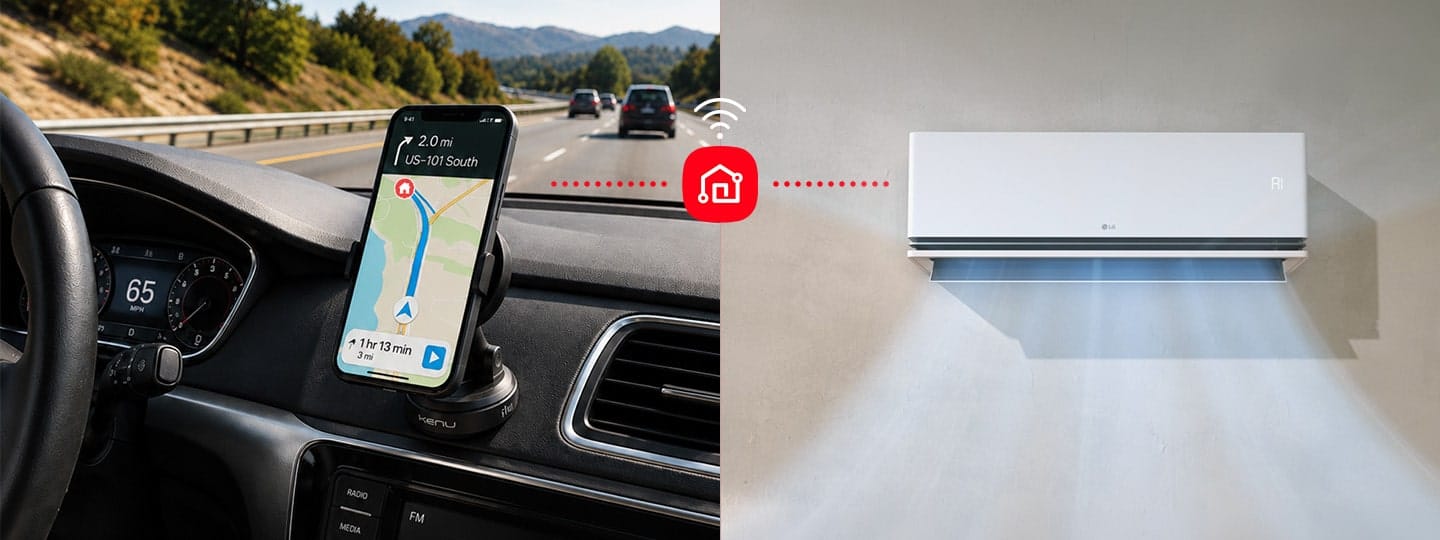
Remote control is convenient, but it doesn’t take the hassle out of figuring out your return time and going out of your way to turn on the air conditioner manually each time. On supported LG DUALCOOL™ AI models, Pre-Cool, Heat4) works with the LG ThinQ app to automatically start the air conditioner as you approach your home, helping cool your space in summer and warm it in winter. By activating cooling or heating at the right time without any manual effort, it helps ensure you walk in the door to comfort.
*This image is AI-generated.
3. Manage Open Windows and Heat Entering from Outside
When windows or doors are open while the air conditioner is running, cool indoor air can escape, and warm outdoor air can enter. If this continues, the air conditioner may need to operate longer to reach the set temperature. Before running your unit, make sure that the windows and doors are properly closed.
Reduce Heat Entering the Room During the Sunniest Hours
Strong midday sunlight can raise the indoor temperature as it enters through windows. Managing the outdoor heat entering room before running the air conditioner may help lower the cooling load. Try the following:
• Block direct sunlight with curtains or blinds.
• Refrain from opening windows during the hottest hours.
• Ventilate the room during cooler parts of the day.
• Refrain from opening doors while cooling is activated.
How LG Helps
Keep Saving Energy While Ventilating or Cleaning
Keeping windows closed during cooling is a useful habit, but there are also times when opening one is unavoidable. You may need to ventilate the room, let in fresh air, or open windows while cleaning. Remembering to adjust the air conditioner every time can be easy to overlook. Window Open Detection5⁾ on select LG DUALCOOL™ AI models detects a sudden change in indoor temperature during cooling, such as the change that can occur when a window is opened, and switches to an energy-saving mode. So when everyday life interrupts your usual cooling routine, the air conditioner can adjust its operation for you. You can ventilate or clean without having to remember every air conditioner adjustment yourself.

*This image is AI-generated.
4. Check Your Energy Usage and Find Saving Habits That Fit Your Routine
People often check how much they spend on shopping or food, but it can be difficult to sense how much electricity an air conditioner is using. When energy use is not visible, it is also harder to determine which habits may need to change. Reviewing energy information can help you understand not only whether your usage is high or low, but also when it increases and which settings you use most frequently.
Check for Usage Patterns That Can Increase Energy Use
How much energy your air conditioner uses isn’t just about how long it’s running. The way you cool your home can make a difference, too. Take a look at your everyday cooling habits and see if any of these sound familiar:
• Cooling for long periods at temperatures below 24°C
• Leaving the same cooling settings on after you step away
• Running the air conditioner after ventilation while windows or doors are still open
• Blocking airflow around the indoor unit with furniture or curtains
Checking your energy use can help you see how these everyday habits affect consumption. From there, you can make small adjustments where needed and use your air conditioner more efficiently.
How LG Helps
Manage Energy Use to Meet Your Target
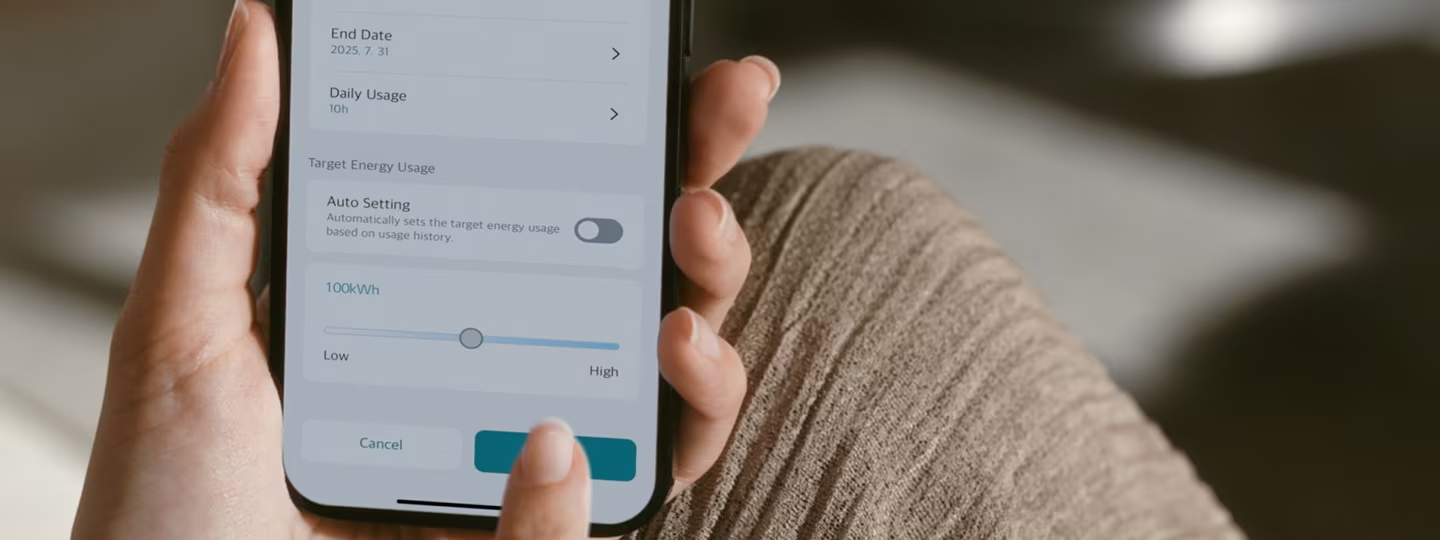
When you’re trying to keep your monthly electricity costs in mind, setting a target is a good start. The harder part is sticking to it throughout the month without constantly checking how much energy you’ve used or changing the way you use your air conditioner. With kW Manager6⁾, you can set a target for how much energy you want to use or spend, while it continuously tracks your usage and helps manage power consumption over time to help you stay closer to your goal. This makes it easier to follow the energy plan you set at the beginning of the month without having to think about how much you should use each day. You can also see whether you’re staying within your target and get notified if you go over it, giving you a clearer way to keep air conditioner electricity consumption and cooling costs in mind throughout the month.
How kW Manager Works for You:
• Set a target energy usage and period
• Track current and accumulated energy use
• Automatically adjust the energy-saving level based on your target
• Receive an LG ThinQ notification if usage exceeds your target
5. Consider Humidity, Not Just Temperature
A room can sometimes feel hot and stuffy even when the temperature is not particularly high. In this situation, many people lower the set temperature, but it does little to help the discomfort caused by high humidity or uneven airflow. When humidity is high, sweat doesn’t evaporate as easily, which can make the room feel hotter and stickier at the same temperature. On the other hand, if cool air is directed toward only one area, some people may feel cold even though the rest of the room is unaffected. To help use your air conditioner efficiently, look beyond the temperature displayed on the screen and consider indoor humidity and how evenly the airflow is distributed throughout the room.
Why Humidity Matters
High humidity can make a room feel warmer than the actual temperature. For example, even at 24°C (76°F), a humid environment may feel hotter and more uncomfortable, while lower humidity can make the same temperature feel noticeably more comfortable.
24°C + 70% RH
→ Sweat evaporates more slowly, making the air feel sticky and uncomfortable.
24°C + 50% RH
→ Sweat evaporates more easily, making the same temperature feel more comfortable.
How LG Helps
Manage Energy Use to Meet Your Target
When you’re trying to keep your monthly electricity costs in mind, setting a target is a good start. The harder part is sticking to it throughout the month without constantly checking how much energy you’ve used or changing the way you use your air conditioner. With kW Manager6⁾, you can set a target for how much energy you want to use or spend, while it continuously tracks your usage and helps manage power consumption over time to help you stay closer to your goal. This makes it easier to follow the energy plan you set at the beginning of the month without having to think about how much you should use each day. You can also see whether you’re staying within your target and get notified if you go over it, giving you a clearer way to keep air conditioner electricity consumption and cooling costs in mind throughout the month.
How kW Manager Works for You:
• Set a target energy usage and period
• Track current and accumulated energy use
• Automatically adjust the energy-saving level based on your target
• Receive an LG ThinQ notification if usage exceeds your target
*The comparison above is for illustrative purposes only. Actual comfort levels may vary depending on factors such as activity level, clothing, airflow, and the indoor environment.
What You Can Do
When a room feels hot and uncomfortable, it’s common to lower the thermostat first. However, if you suspect humidity is the real cause, try these approaches before lowering the temperature further.
• Maintain an appropriate thermostat setting.
• Improve air circulation with a fan or air circulator.
• Ventilate briefly and efficiently.
• Use a dehumidifier when needed.
How LG Helps
Balance Temperature and Humidity for Comfort
After your air conditioner has been running for a while, the temperature may feel just right, but continued dehumidification can leave the air feeling dry. Comfort Humidity Control on LG DUALCOOL™ AI adjusts cooling to help maintain the set temperature while keeping indoor humidity at around 60%. By helping prevent humidity from dropping more than needed during use, it makes it easier to stay comfortable without having to frequently adjust the temperature or operating mode yourself.

*This image is AI-generated.
A Daily Checklist for Using Your Air Conditioner Efficiently
Here is a simple checklist that summarizes the tips above and makes them easier to apply in daily life.
| Before starting cooling | ☐ Close windows and doors☐ Reduce direct sunlight and heat entering from outside |
| When starting cooling | ☐ Avoid setting the temperature too low from the beginning☐ Maintain the set temperature after the room has cooled sufficiently |
| While cooling | ☐ Check whether the airflow is reaching the entire room☐ Consider humidity as well as temperature |
| When leaving home | ☐ Avoid continuing to cool an unoccupied space for an extended period☐ Use LG ThinQ remote control or pre-cooling before returning home when needed |
| During use | ☐ Check energy usage and manage your target usage |
There is no single way to use less energy with your air conditioner. What matters is finding cooling habits that work for your home and routine and making them part of everyday life. A stable temperature, thoughtful cooling of occupied spaces, and regular attention to air conditioner electricity consumption can all add up over time. Smart functions can make these everyday choices easier to follow, but they work best alongside habits that fit the way you live. Start with the daily air conditioner tips that feel easiest to maintain, and build from there to make energy-saving a more natural part of staying comfortable at home.
FAQ
Q.
Is it more efficient to leave the air conditioner running continuously?
A.
Not always. When the indoor temperature needs to be maintained for a short period, an inverter air conditioner may reduce its cooling output and operate steadily. However, if you will be away for an extended period, turning the unit off or using scheduled operation may be more appropriate than continuing to cool an unoccupied space. Consider how long you will be away, the difference between indoor and outdoor temperatures, and the insulation of your home.
Q.
Can using a fan or air circulator with an air conditioner improve efficiency?
A.
It can. A fan or air circulator can help distribute cool air more evenly throughout the room, making it easier to feel comfortable without lowering the set temperature more than necessary.
Q.
Should I turn off my air conditioner every time I leave home?
A.
It depends on how long you will be away and the indoor conditions. Short trips and longer absences may require different approaches. On supported products, occupancy sensing and remote-control features can also help manage operation more conveniently.